Mark up and blur screenshots before you share them
Draw arrows and boxes, add a note or blur an email on any image you copied, then save it back to your history.
Amas
· 2 min read
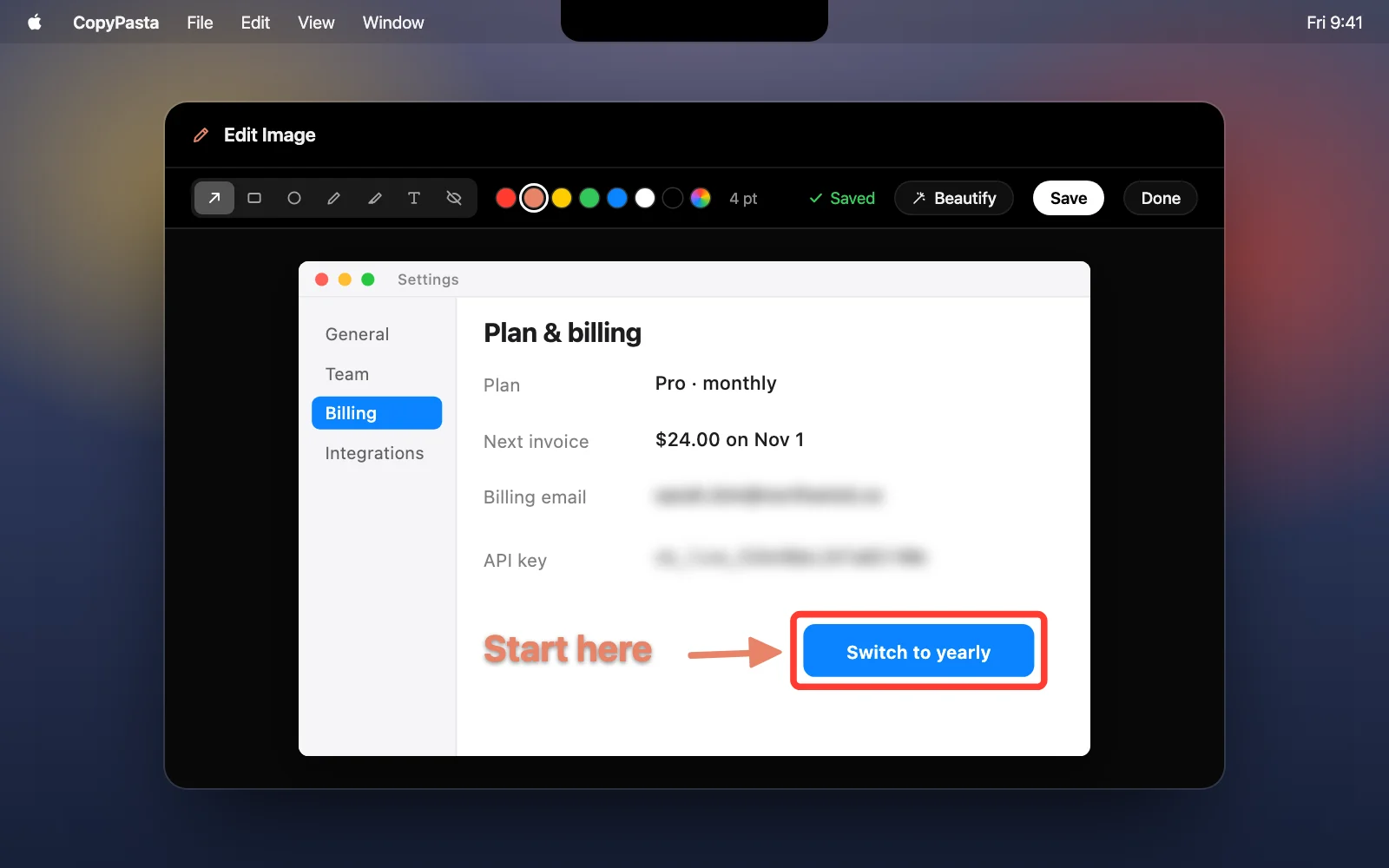
When you share a screenshot, you usually need to point at something in it, or hide an email or API key first. That used to mean opening it in Preview or another app, exporting it, and copying it again. Now you can mark it up right in CopyPasta, and the edited image stays in your history.
How it works
- Hover over an image’s card and click the pencil, or right-click it and choose Edit…. In an image’s own window, press ⌘E.
- Pick a tool, a color and a size, then draw on the image.
- Click Save (⌘S) to replace the image in your history, or choose Save as New Image (⇧⌘S) to keep the original too.
The tools
- Arrow, rectangle and ellipse to point at a button or circle a number.
- Pen and highlighter for freehand notes, or to mark a line of text the way you would on paper.
- Text for a short label. It gets a soft shadow, so it stays readable on busy screenshots.
- Blur to hide an email, a name or a key. It’s strong enough that the text under it can’t be read.
Good to know
- Fix anything. Click a mark to select it, then drag it to move it or use its handle to rotate it. Press ⌫ to delete it.
- Undo goes all the way back. ⌘Z and ⇧⌘Z cover everything since you opened the image, even after you save.
- Search stays accurate. The text in the edited image is recognized again, so words you blurred no longer show up when you search your history.
- Make it ready to post. Click Beautify (⌘B) to put the edited image on a background, sized for X, LinkedIn and more. See Beautify.
- Hidden secrets stay protected. If an image is hidden as a secret, CopyPasta asks for Touch ID before it opens in the editor.
Download CopyPasta and try every feature free for 7 days. No account, no credit card.