Summarize and rewrite clips with Apple Intelligence
Summarize, proofread or rewrite any text clip, or ask a question about it, right in CopyPasta and on your Mac.
Amas
· 1 min read
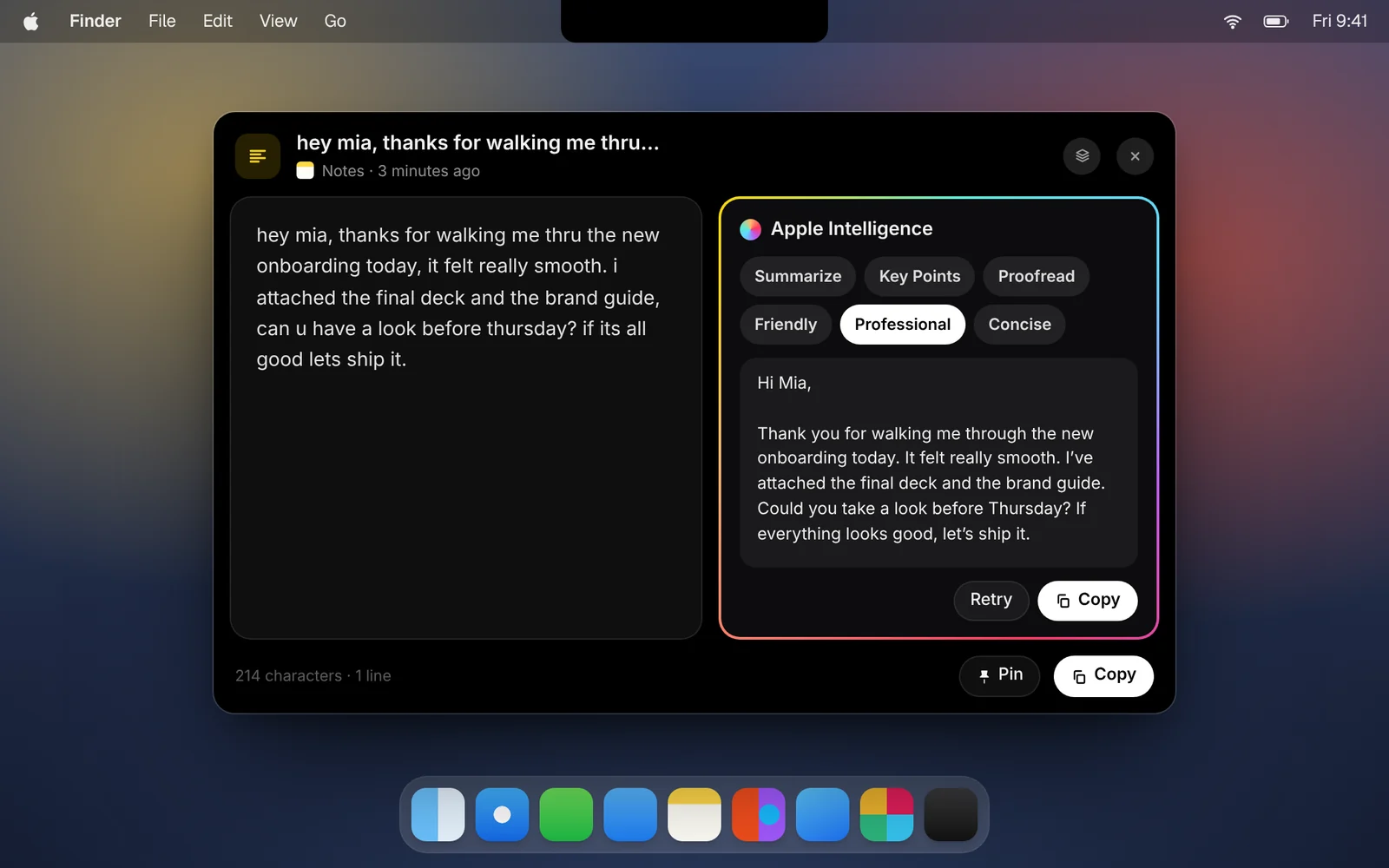
On Macs with Apple Intelligence, CopyPasta can do more than keep your text. It can tidy it up, shorten it, or explain it.
How it works
- Open a text or code clip in its window.
- Click Apple Intelligence, or press ⌘I.
- Choose what to do, or type a question about the text and press ↩.
- When the result is ready, click Copy, or ask again for a different result.
What it can do
- Summarize the text in a few sentences, or list its Key Points.
- Proofread it, fixing spelling, grammar and punctuation without changing what you meant.
- Rewrite it to sound Friendly or Professional, or make it Concise.
- For code, Explain what it does in plain language, step by step.
Good to know
- On your Mac. It uses Apple’s on-device model, so your text isn’t sent anywhere.
- Requirements. It needs macOS 26 and a Mac that supports Apple Intelligence. On other Macs, the button isn’t shown.
- Long text. The on-device model reads a limited amount, so for very long clips only the beginning is used. CopyPasta tells you when that happens.
Download CopyPasta and try every feature free for 7 days. No account, no credit card.